.png?width=200&height=32&name=Logo_amaran_Blue_20240811a%20(3).png)
The amaran Verge Max can be controlled directly from its front-facing knobs and Power Button, or wirelessly through the amaran app and Sidus Link over Bluetooth. This article covers the on-board controls, the display menu screen, and the light's control modes.
Controls Overview
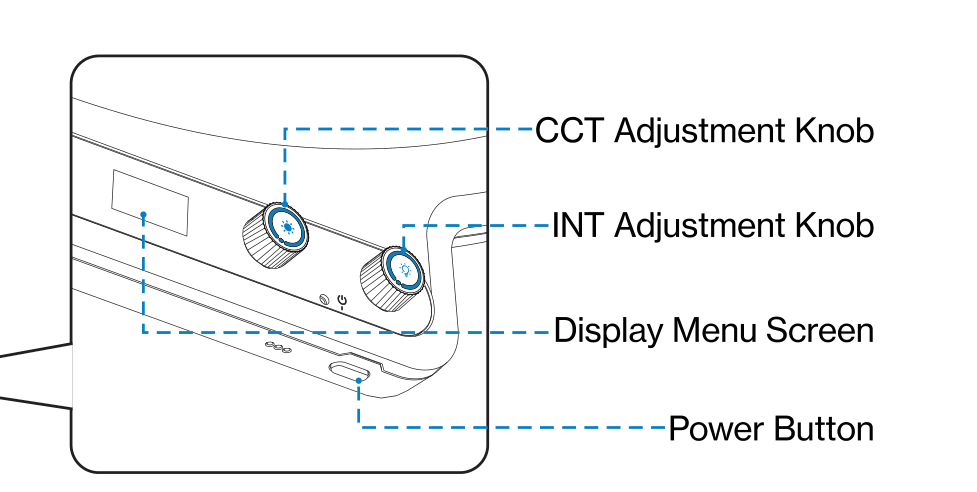
- Power Button: Press to turn the light on or off. Hold for 2 seconds to reset Bluetooth. Double-click to toggle Studio Mode on or off.
- INT Adjustment Knob: Rotate to adjust the light's brightness.
- CCT Adjustment Knob: Rotate to adjust the light's color temperature.
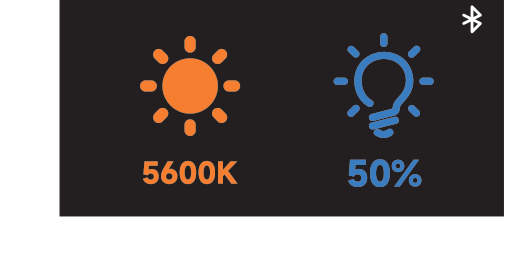
- Display Menu Screen: Displays the light's brightness and color temperature settings.
- amaran Verge Lock Mount: Mounts the light with amaran Verge Lock compatible accessories.
- USB-C Charging Port: Used to power the fixture via a PD3.0-supported power supply.
Adjusting Brightness and Color Temperature
- INT (Intensity): Rotate the INT Adjustment Knob to adjust brightness from 0% to 100%.
- CCT (Correlated Color Temperature): Rotate the CCT Adjustment Knob to adjust color temperature from warm white (2,700K) to cool white (6,500K).
The menu screen displays the current brightness and color temperature settings.
Bluetooth Reset
Bluetooth is turned on by default. To reset it:
- With the light turned on, press and hold the Power Button for 2 seconds.
- When the pop-up window appears, continue holding the button until the progress bar completes to finish the Bluetooth reset.
If you release the button before the progress bar is complete, the Bluetooth reset will be canceled.
FX Mode
FX Mode is enabled through the amaran app. The amaran Verge Max supports 7 lighting effects:
- Fireworks
- Faulty Bulb
- Lightning
- TV
- Strobe
- Explosion
- Fire
Studio Mode
With the light turned on, double-click the Power Button to toggle Studio Mode on or off. The indicator light will light up for 2 seconds and then turn off. Studio Mode is turned off by default.
Firmware Updates
Firmware can be updated online through the amaran app or Sidus Link. The display screen shows the update progress, along with a checkmark on success or an error icon on failure.
Control Methods
- On-board: Front-facing INT and CCT knobs plus the Power Button.
- amaran App: Available on iOS, Android, and other platforms, plus a Mac and Windows desktop app from the amaran website.
- Sidus Link: For firmware updates and broader control.
- Stream Deck: For quick, on-camera brightness and color adjustments.
Visit amarancreators.com for more details on using the app to control your amaran lights.