.png?width=200&height=32&name=Logo_amaran_Blue_20240811a%20(3).png)
This guide covers powering on your amaran Verge Max for the first time and mounting it to your desk or a stand. For the on-board knobs, menu screen, and app control, see [amaran Verge Max] Operation & Controls.
Power Supply and Power On/Off
The amaran Verge Max is powered over USB-C from a PD3.0-supported power supply. We recommend using the included amaran 65W USB-C PD3.0 Power Adapter.
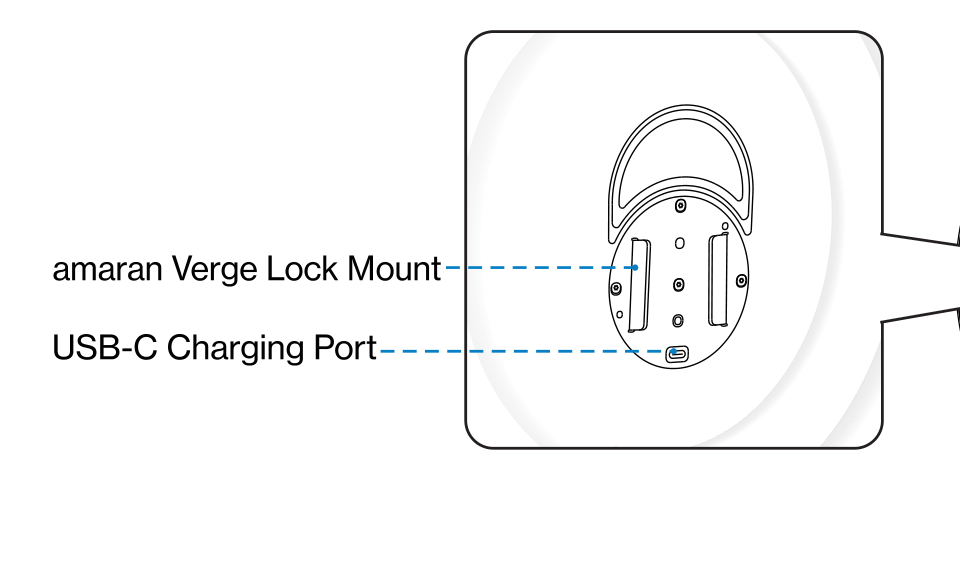
- Plug the end of the power adapter into the USB-C Charging Port on the back of the light. The display will automatically light up after plugging in.
- Press the Power Button on the bottom of the fixture to turn the light on. The light will resume its previous settings from before it was turned off.
- Press the Power Button again to turn the light off.
Note: The amaran Verge Max supports USB-C PD3.0 power supply standards but is not compatible with some third-party proprietary charging protocols. Please make sure to select an appropriate power supply device.
Light Installation
Always mount the fixture onto a stand before connecting it to power. When disassembling, unplug the power cable first to avoid interference between the plug and the stand.
Method 1: amaran Verge Lock Desk Clamp Stand
- Before installing, make sure your desk or mounting surface is between 2 cm and 7 cm (0.79 in to 2.75 in) thick so the desk clamp stand can be secured.
- Clamp the base onto the desktop and rotate the locking screw to secure it.
- Connect the two columns via the screws and tighten to secure.
- Insert the horizontal mounting arm onto the vertical column at your desired position and tighten to secure. Make sure the protruding side of the arm faces downward.
- The stand mounts to the back of the light via the amaran Verge Lock. Align the back of the light with the Verge Lock on the mounting arm and gently insert the light in place. The Verge Lock should automatically snap securely into place.
Method 2: amaran Verge Lock Stand Adapter
- Insert the bottom of the Verge Lock Stand Adapter onto a light stand, then insert and lock the tie down to secure. You can mount the adapter horizontally or vertically for different setups.
- Align the back of the light with the Verge Lock on the stand adapter and gently insert the light in place. The Verge Lock should automatically snap securely into place.
- Rotate the tilting bracket knob to adjust the angle and height of the light.
Light Control Grid Installation
The optional light control grid narrows and shapes the light's spread. Install it only after the fixture is properly mounted and secured.
- Unfold the grid support ring. The support ring has strong elastic force, so unfold it carefully to prevent injury. Align the Velcro edges of the light control grid to the support ring.
- Securely snap the 5 included clips evenly along the edge of the light, making sure the raised side of each clip with the amaran logo faces the top of the light.
- Place the edge of the assembled light control grid into a clip and push it into the buckle to fasten. Repeat for the remaining 4 clips.
Using the amaran App
Download the amaran App from the iOS App Store, Google Play Store, and other platforms to expand the light's functionality. You can also download the amaran desktop app for Mac and Windows from the amaran website. Visit amarancreators.com for more details on using the app to control your amaran lights.