.png?width=200&height=32&name=Logo_amaran_Blue_20240811a%20(3).png)
This article covers the onboard controls of the amaran Pano 60c, its display menu, and every lighting and system mode available from the main menu.
Onboard Controls
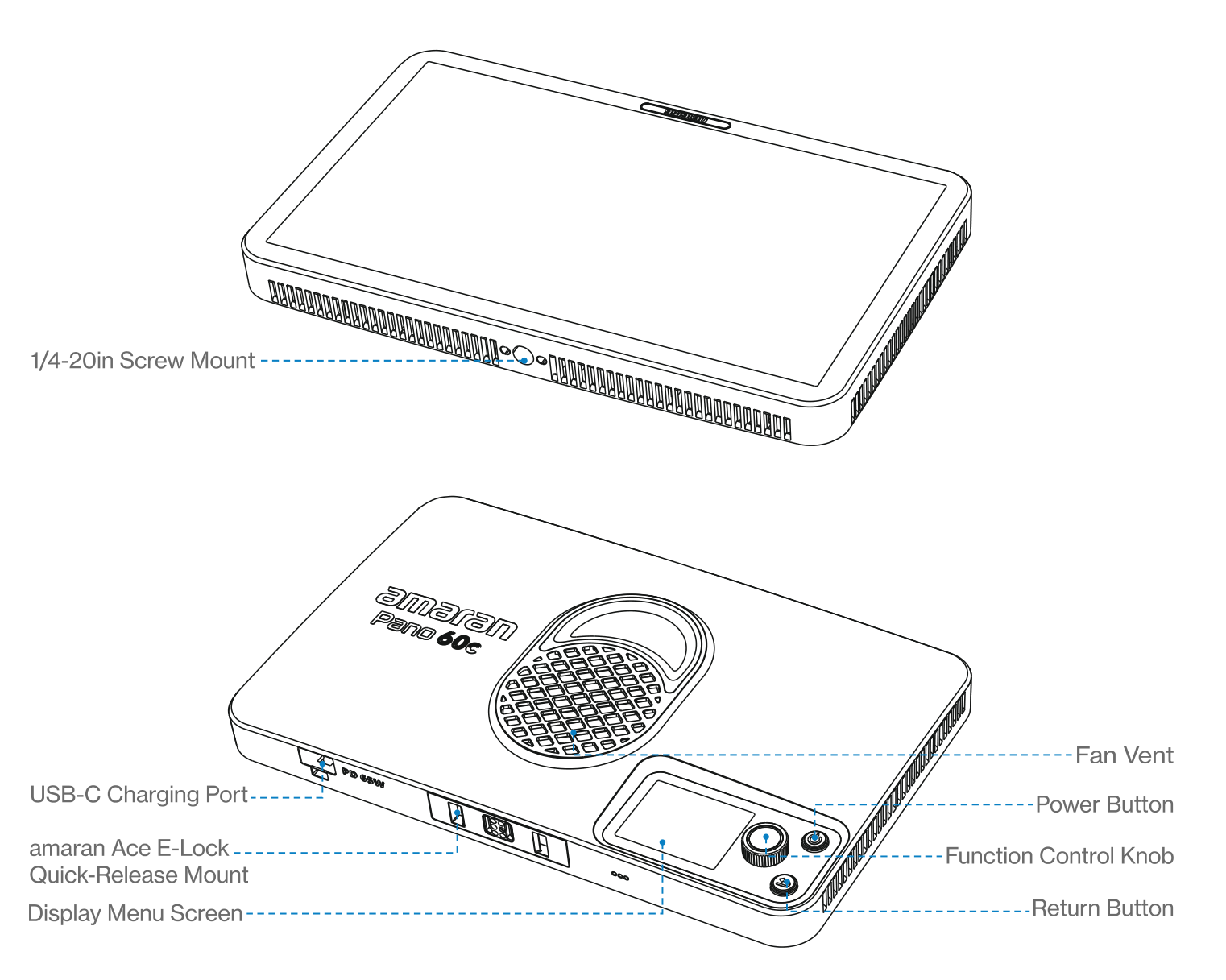
- Power Button: Press to turn the light on, and hold for 1 second to turn it off. The indicator light is on when the light is powered on.
- Function Control Knob: Rotate to toggle the menu or adjust values and lighting settings. Press the knob to confirm parameters.
- Return Button: Click to return to the previous menu screen. Hold or double click to execute customizable shortcuts set in Custom Mode.
- Display Menu Screen: A TFT screen that displays the settings and status of your light.
- Fan Vent: Helps the light dissipate heat. Do not block the fan vent when using the light.
- USB-C Charging Port: Charges the fixture via a PD-supported power supply.
- amaran Ace E-Lock Quick-Release Mount: Install and disassemble the light in under a second with the amaran Ace Lock ecosystem. The light can also be powered by the amaran Peak power bank accessory (sold separately).
- 1/4-20in Screw Mount: Mounts the light onto 1/4-20in tripods or other equipment.
Using the Main Menu
Rotate and press the knob to select light modes and settings from the main menu.
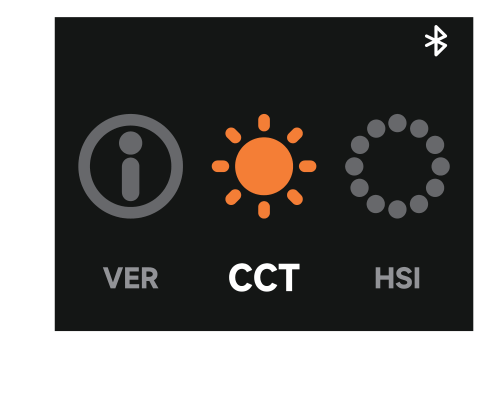
CCT
Rotate and press the knob to enter CCT mode. Press the knob to select a parameter and rotate the dial to adjust its value.
- INT (Intensity): Adjust brightness from 0% to 100%.
- CCT (Correlated Color Temperature): Adjust color temperature from warm white (2,300K) to cool white (10,000K).
- G/M (Green-Magenta): Adjust the green-magenta shift in plus or minus 10 increments.
After 3 minutes of inactivity in CCT Mode, the light automatically switches to Quick Operation Mode, which lets you adjust settings without toggling through the menu. The screen displays the current color temperature and brightness. Rotate the knob to adjust brightness; press and rotate the knob to adjust color temperature. Press the Return button to exit and return to the previous interface.
HSI
Rotate and press the knob to enter HSI mode. Press the knob to select INT, HUE, or SAT and rotate the dial to adjust.
- INT (Intensity): Adjust brightness from 0% to 100%.
- HUE: Adjust hue from 1 degree to 360 degrees.
- SAT (Saturation): Adjust saturation from 0% to 100%.
RGB
Rotate and press the knob to enter RGB mode. Press the knob to select INT, Red, Green, or Blue and rotate the dial to adjust.
- INT (Intensity): Adjust brightness from 0% to 100%.
- Red / Green / Blue: Adjust each channel value from 0% to 100%.
FX (Lighting Effects)
Rotate and press the knob to enter FX mode. Rotate and press the knob to select a lighting effect. Press again to enter its settings and rotate the dial to adjust the corresponding values.
Supported lighting effects: Fireworks, Faulty Bulb, Lightning, TV, Pulsing, Strobe, Explosion, Fire, Paparazzi, Welding, Cop Car, and Party Lights.
Bluetooth Reset
Rotate and press the knob to enter BT mode. Hold down the knob until the end of the progress bar to reset Bluetooth. Release the knob to cancel. The screen confirms whether the reset was successful; if unsuccessful, please reset Bluetooth again.
Custom Mode
Rotate and press the knob to enter Custom mode. Press the knob to assign customizable shortcuts to a long press (Hold) or double click (Double) of the Return button. Rotate the dial to select between None, CCT, Rotation, HSI, or BT Reset. A short press of the Return button always defaults to the return/back function and cannot be changed.
Language
Rotate and press the knob to enter Language settings. Rotate the dial to toggle between English and Chinese, then press the knob to confirm.
Fan Mode
Rotate and press the knob to enter Fan mode. Rotate the dial to toggle between Silent and Smart, then press the knob to confirm.
- Silent Mode: The fan turns off completely and the light produces no noise. Power output is limited to 17W.
- Smart Mode: The fan speed automatically adjusts according to the temperature of the light.
Studio Mode
Rotate and press the knob to enter Studio mode. Press the knob to cycle between On and Off. When Studio mode is on, the light automatically turns on after connecting to a power supply, reducing the need to manually press the power button.
Expanded CCT
Rotate and press the knob to enter Expanded CCT mode. Press the knob to cycle between On and Off. When on, the adjustable color temperature in CCT mode expands to 1,800K to 20,000K. Please note that color rendering in the expanded CCT range is lower.
Firmware Upgrade
Firmware can be updated online via the amaran app or Sidus Link. The VER screen displays the current software and hardware versions.
Using the amaran App
Download the amaran mobile app from the iOS App Store, Google Play Store, and other platforms to enhance the functionality of the light. You can also download the amaran desktop app for Mac and Windows from the amaran website. Please visit amarancreators.com for more details on how to use the app to control your amaran lights.