
This article covers the on-device controls of the amaran Cam: the indicator button, USB-disk Mode, reading the status indicator, and using Auto-Lighting with amaran Desktop. For mounting and connecting the camera, see [amaran Cam] Getting Started.
Controls Overview
- Privacy Protection Dial: around the lens on the front of the camera.
- Indicator Button: on the front of the camera, to the right of the lens. Triggers functions such as USB-disk Mode.
- Status Indicator: on the front of the camera. Shows the current device status.
- USB-C Port: on the rear of the camera. Connects the camera to your computer.
For a labeled diagram of every component, see [amaran Cam] Overview.
Using the Indicator Button
Press the indicator button to trigger functions. Future updates are available in the amaran App or on the official website.
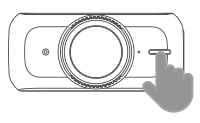
| Function | Button |
|---|---|
| USB-disk Mode | Short-press three times + long-press once |
Reading the Status Indicator
| Device Status | Indicator Light |
|---|---|
| Normal operation | Blue solid |
| USB-disk Mode | Yellow solid |
| Firmware upgrading | Yellow slow blinking |
| Upgrade failed | Red blinking |
| Error | Red solid |
| Sleep mode | Off |
Auto-Lighting
Using AI image recognition, the amaran Cam with amaran Desktop and a compatible setup can analyze the scene and automatically configure optimal camera and lighting settings for a more professional streaming result.
To use Auto-Lighting:
- Install amaran Desktop, available from the official amaran website. See [amaran Cam] Getting Started.
- Use compatible amaran lighting fixtures. See the amaran App for the compatibility list.
Software
The camera can be used immediately after connecting it to your computer. Installing amaran Desktop lets you adjust image settings and use features such as Smart Lighting Linkage. The printed user guide also includes a QR code to download the amaran app. Visit amarancreators.com for more information on controlling amaran products with the app.