
This guide covers the system requirements for the amaran Cam, placing and mounting the camera, connecting it to your computer, and installing amaran Desktop. For the indicator button and status light, see [amaran Cam] Operation & Controls.
System Requirements
- Windows 10 (64-bit) or later
- macOS 13.0 or later
Recommended Configuration for 4K 60fps
Recommended Apple computers:
- MacBook Pro (2020, with M1 chip or later)
- MacBook Air (2020, with M1 chip or later)
- iMac Retina (2021, with M1 chip or later)
Recommended PC configuration:
- CPU: 10th Generation Intel® Core™ i5 processors or later
- RAM: 8GB
Placement
The amaran Cam supports multiple deployment options:
- On a monitor: use the magnetic bracket to mount the camera to a monitor for horizontal or vertical shooting.
- On a stand or tripod: use the 1/4-20 threaded hole on the bracket base to mount the camera to a stand or tripod.
- On a flat surface: place the camera directly on a stable, level surface.
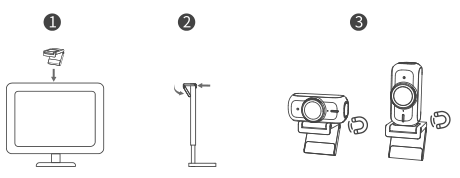
Connecting to a Computer
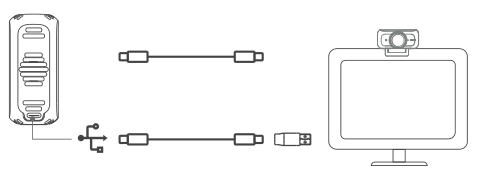
Connect the camera to your computer using the included USB-C to USB-C video cable. The amaran Cam works with both Windows and macOS computers.
- Plug the cable into the USB-C port on the rear of the camera.
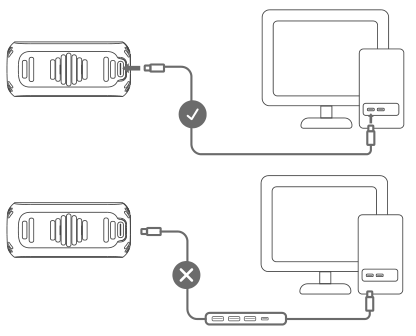
- Plug the other end directly into a USB 3.0 port on your PC or Mac, or into a powered docking station. The included USB-C to USB-A adapter lets you connect to a USB-A port.
To ensure stable power delivery, do not connect the camera through an unpowered USB hub or adapter. Connect directly to the computer or to a powered docking station. If you use a USB-C to USB-A cable, use one that supports 5Gbit per second data transfer and 5W power delivery.
Installing amaran Desktop
The camera can be used immediately after connecting it to your computer. To adjust image settings and use features such as Smart Lighting Linkage, install amaran Desktop.
You can download amaran Desktop from the official amaran website. For more information on controlling amaran products with the app, visit amarancreators.com. To use Auto-Lighting with compatible amaran fixtures, see [amaran Cam] Operation & Controls.